
01
Audit Overview
Your store's untapped revenue potential — and how to unlock it
Why We Created This Audit
We analyzed https://meenabazaar.com the same way we've audited 350+ e-commerce stores — looking for the specific gaps between your current experience and what top-performing Fashion & Apparel stores deliver. Every finding in this report is a revenue opportunity backed by industry data and competitive benchmarks.
Critical
Important
Opportunities
What We Analyzed
- UX & Conversion Design findings
- Performance & Speedvs 3 competitors
- Technology & App StackPlatform + 5 apps
- Industry BenchmarksFashion & Apparel
Pages Analyzed
- Homepage findings
- Collection Pages findings
- Product Pages (PDP) findings
- Cart & Checkout findings
 This audit was prepared by Growisto — a CRO-led Website development team behind 167% conversion growth for Atomberg, 46% CR lift for TyresNmore, and 350+ e-commerce projects.
03
UX & Conversion Findings
Page-by-page analysis with visual comparisons against top Fashion & Apparel stores
Add quick-add and wishlist icons to homepage product tiles so shoppers can save or add to cart without entering the PDP.
Feature not present
Meena Bazaar — Mobile
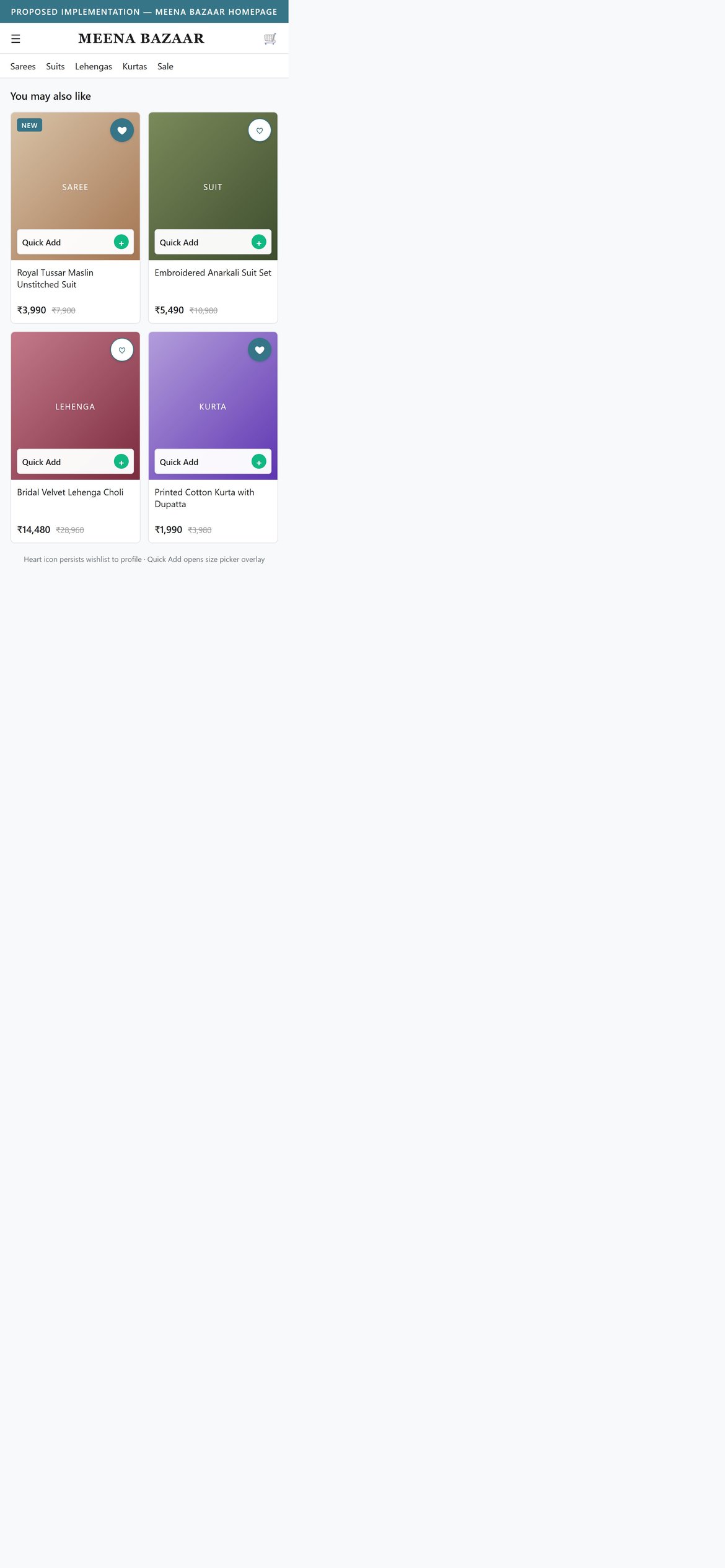
Proposed Implementation — Meena Bazaar Homepage
Observations
- Homepage product tiles show only image, title, and price -- no heart, no quick-add, no quick view.
- Every action on a tile requires a full PDP navigation.
- Wishlist on tiles is a 10/10 standard pattern across the fashion benchmark set.
Recommendations
- Add a heart/wishlist icon to every product tile and persist it to the customer profile.
- Add a Quick Add button that opens a variant picker overlay when the product has multiple sizes.
- Reveal both icons on tap to keep the tile clean until the shopper engages.
Add predictive search with category, product and no-results suggestions -- today the search bar has no autocomplete.
Feature not present
Meena Bazaar — Mobile
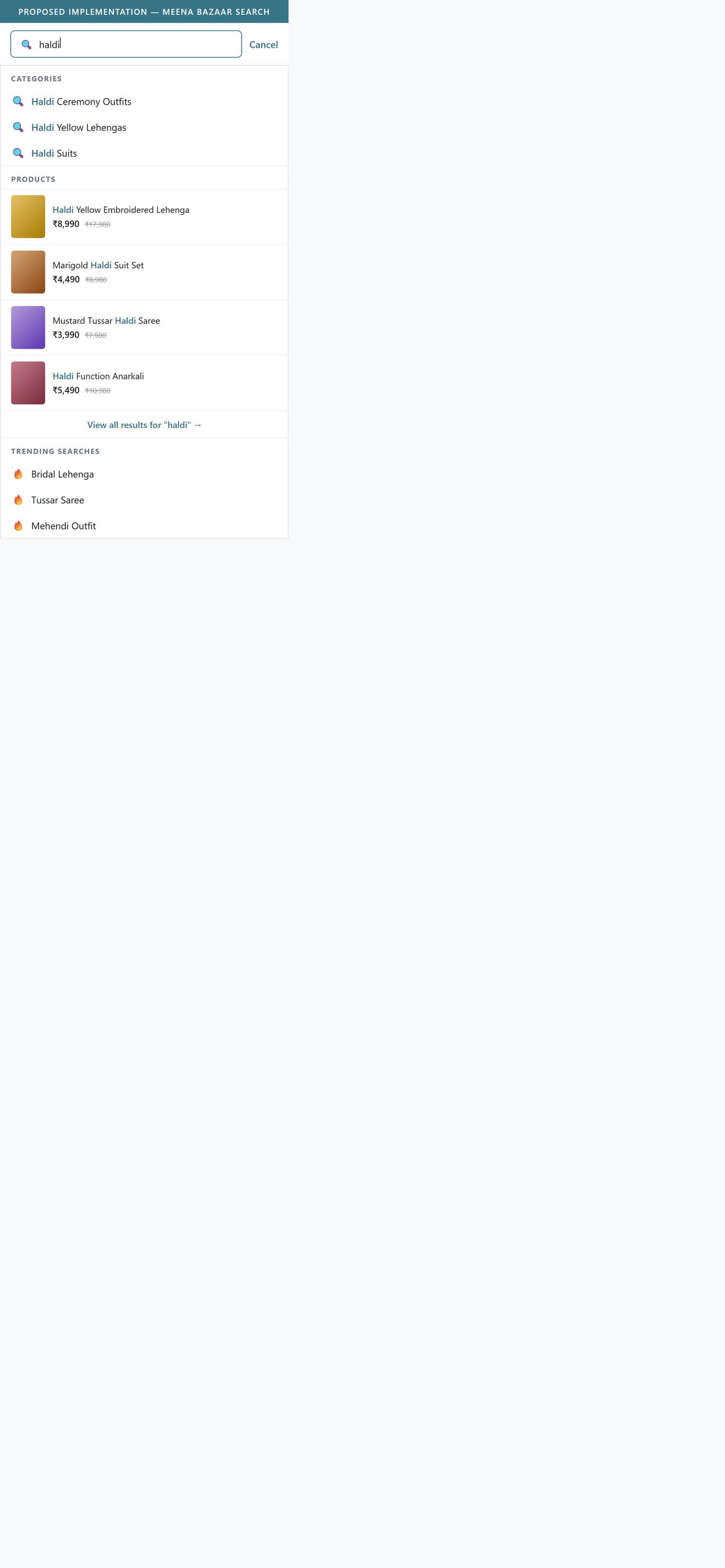
Proposed Implementation — Meena Bazaar Homepage
Observations
- Typing in the search bar produces no dropdown -- shoppers must hit Enter and load a results page to see anything.
- Predictive search is a 10/10 standard in the fashion benchmark set.
- Ethnic-wear queries are often occasion-based (haldi, mehendi, reception) where instant suggestions speed discovery.
Recommendations
- Install a predictive search app (Searchanise, Boost AI, Algolia) that shows product results and category links while typing.
- Handle misspells with a Did-you-mean fallback and a no-results suggestion strip.
- Surface trending and recently-viewed terms in the empty state.
Add size and colour swatches to collection cards so shoppers can scan variants without entering each PDP.

Meena Bazaar — Mobile
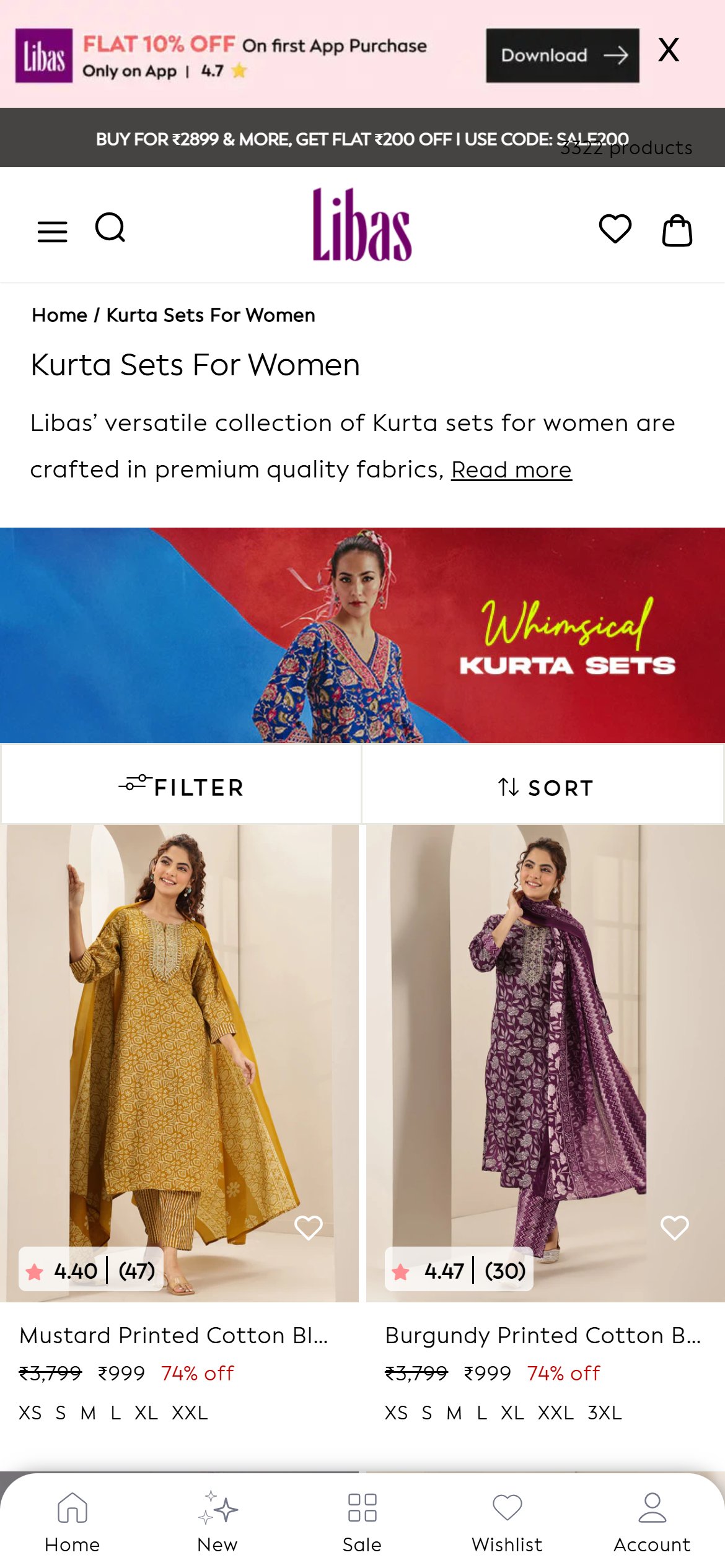
Libas — Mobile
Observations
- Collection cards show only image, title, and price -- no size pills, no colour dots, no variant indicator.
- Shoppers cannot tell whether their size is in stock without clicking each tile.
- Variant indicators on cards are a growing standard at 7/10 across the benchmark set.
Recommendations
- Add size pills to each collection card showing in-stock sizes; strike out OOS sizes.
- Show up to four colour dots under the card with a plus-N overflow indicator.
- Tapping a swatch should swap the card image without a PDP load.
Add pagination or a Load More control on collection pages -- the catalogue loads in a single DOM today.
Feature not present
Meena Bazaar — Mobile
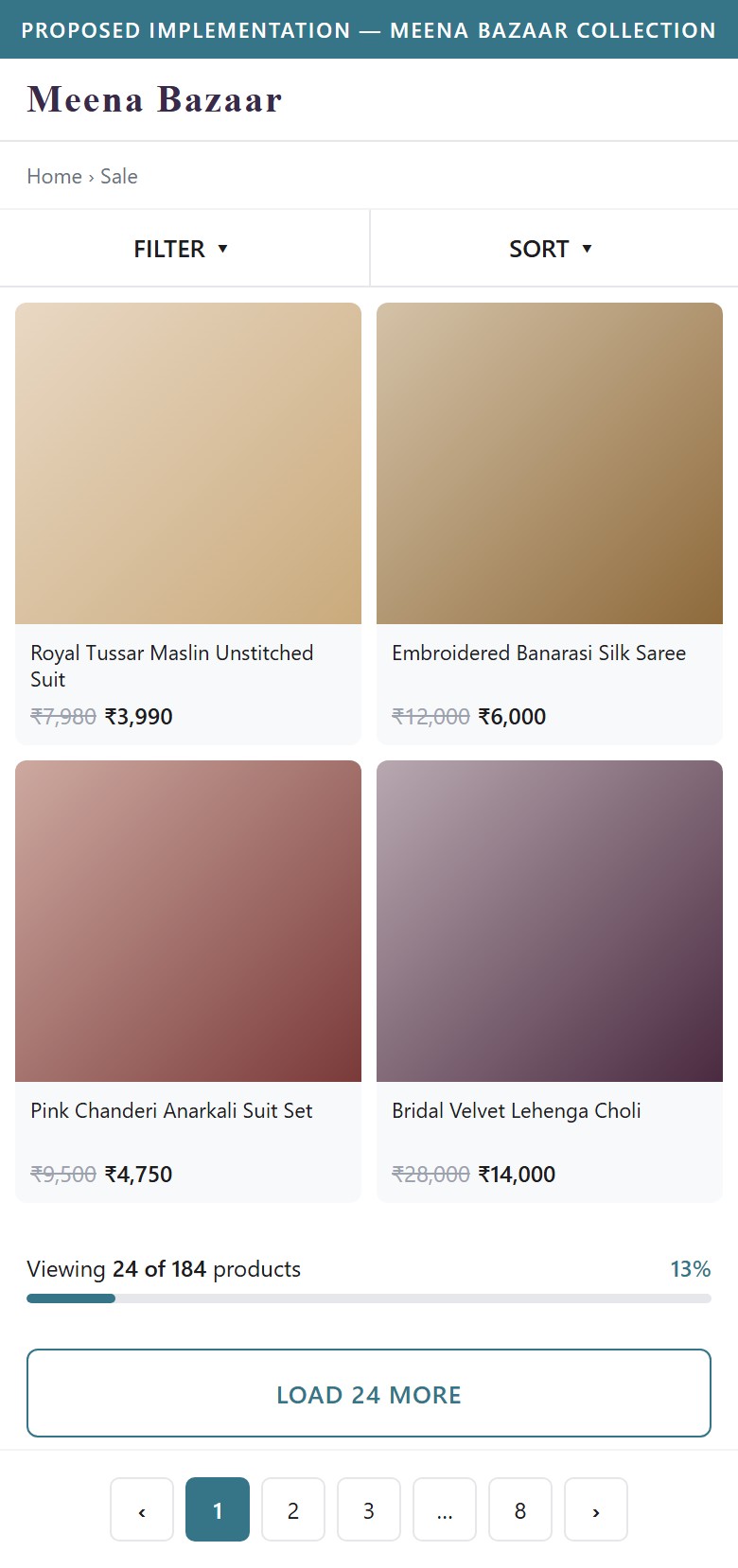
Proposed Implementation — Meena Bazaar Collection
Observations
- The collection page renders every product on one page with no pagination, no Load More button, and no lazy-load sentinel.
- On mobile this inflates DOM weight and breaks scroll-depth analytics.
- Pagination or lazy-load is a 9/10 standard in the fashion benchmark set.
Recommendations
- Load the first batch of products on initial render, then expose a Load More control.
- Show the running count (Viewing X of N) so shoppers know how much catalogue remains.
- Add numbered pagination at the bottom for users who want to skip ahead.
Surface a star rating and review count above the ATC on PDP -- the product currently shows Be the first to write a review.

Meena Bazaar — Mobile
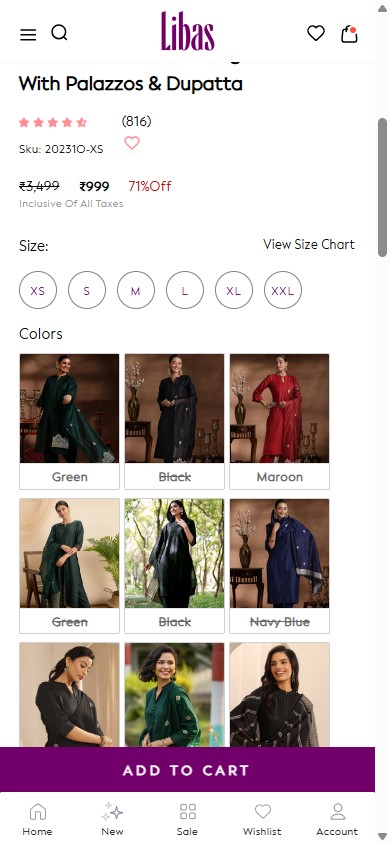
Libas — Mobile
Observations
- Product title and price render above the fold with no rating or review count.
- The Judge.me widget further down reads Be the first to write a review -- zero ratings collected on this SKU.
- Star rating + review count above the fold is a 7/10 growing standard across benchmarks.
Recommendations
- Run a post-delivery review campaign (Judge.me + Klaviyo) to seed reviews on top SKUs.
- Once seeded, render an inline star + review count beneath the product title, linked to the reviews section.
- Aggregate parent-product reviews to the variant level so all colours and fabrics inherit the rating.
Add a quantity selector beside ATC so gifting and bridal-party buyers can order multiple units in one step.
Feature not present
Meena Bazaar — Mobile
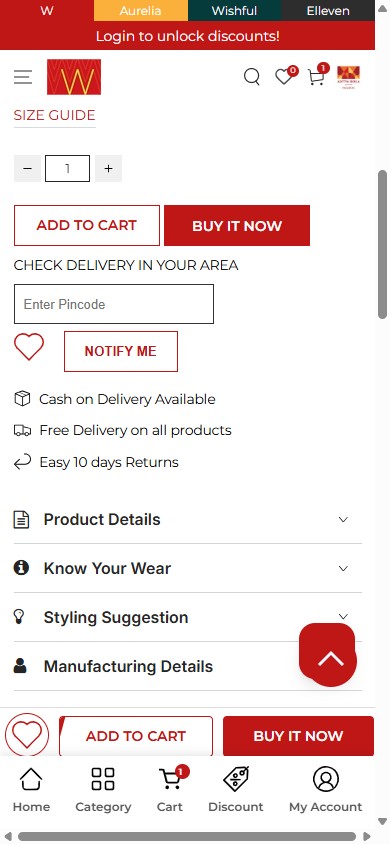
W for Woman — Mobile
Observations
- The PDP shows variant pills (Size, Colour, Fabric) followed directly by Add To Cart -- no quantity stepper.
- Bridal-party and gifting orders force shoppers to add and then edit in the cart, doubling friction.
- Quantity steppers are a 10/10 universal pattern across the fashion benchmark set.
Recommendations
- Add a minus/plus quantity stepper between the variant block and the ADD TO CART button.
- Mirror the stepper inside the cart so the selection persists.
- Track add-to-cart quantity in analytics to spot bridal-party demand spikes.
Add a pincode delivery checker with COD eligibility on PDP -- today there is no way to confirm serviceability before checkout.
Feature not present
Meena Bazaar — Mobile
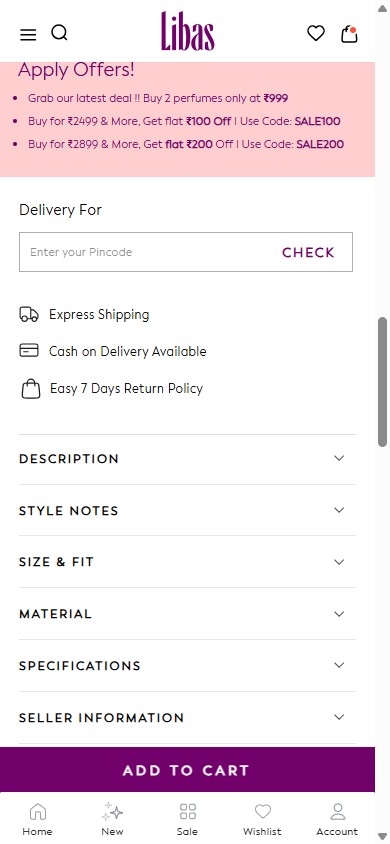
Libas — Mobile
Observations
- The PDP shows generic shipping copy but offers no pincode input to confirm serviceability or delivery date.
- Tier-2 and tier-3 buyers, a meaningful share of the Indian ethnic-wear market, need to know if COD is available before adding to cart.
- Pincode checkers are a 5/5 standard across the India ethnic-wear benchmark set.
Recommendations
- Install a pincode checker above ADD TO CART that returns expected delivery date and COD eligibility in one call.
- Render the response inline without a page reload.
- Cache the entered pincode against the customer profile so the check auto-runs on subsequent PDPs.
Add a Complete the Look cross-sell strip in the cart -- today the cart shows zero recommendations between the line item and CHECK OUT.
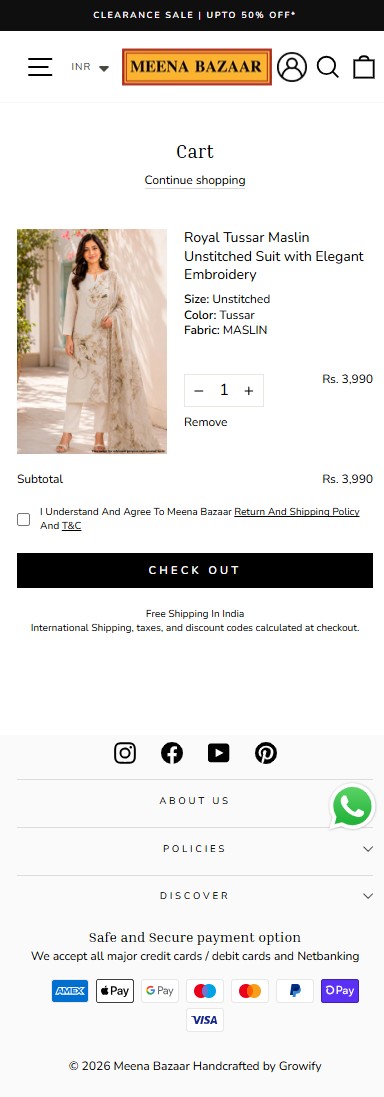
Meena Bazaar — Mobile
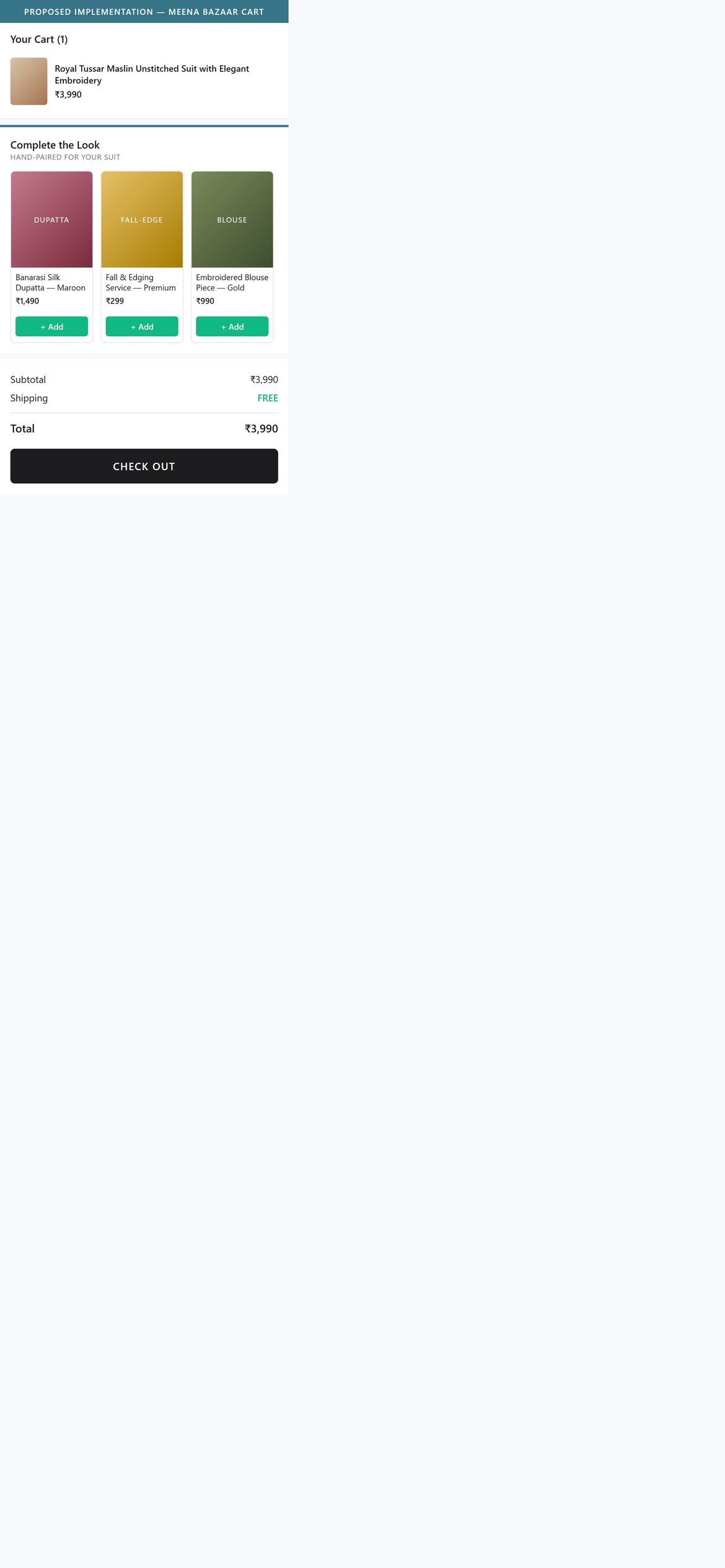
Proposed Implementation — Meena Bazaar Cart
Observations
- The cart renders only line items, subtotal, T&C checkbox and CHECK OUT -- no FBT, no Complete the Look, no Bestsellers strip.
- Ethnic-wear orders naturally pair with dupattas, fall-edging, blouse pieces and matching accessories -- the cart is the highest-intent place to expose them.
- Cart cross-sell is a 7/10 growing standard across the fashion benchmark set.
Recommendations
- Add a Complete the Look strip below the cart summary with curated pairings per parent category (Suit/Dupatta, Saree/Blouse, Lehenga/Jewellery).
- Allow one-tap add-to-cart on each pairing without leaving the cart page.
- Fall back to category bestsellers when manual curation is missing for a SKU.
Expose Shop Pay, Google Pay and Razorpay Magic express buttons alongside CHECK OUT -- today the cart shows only the standard checkout button.
Feature not present
Meena Bazaar — Mobile
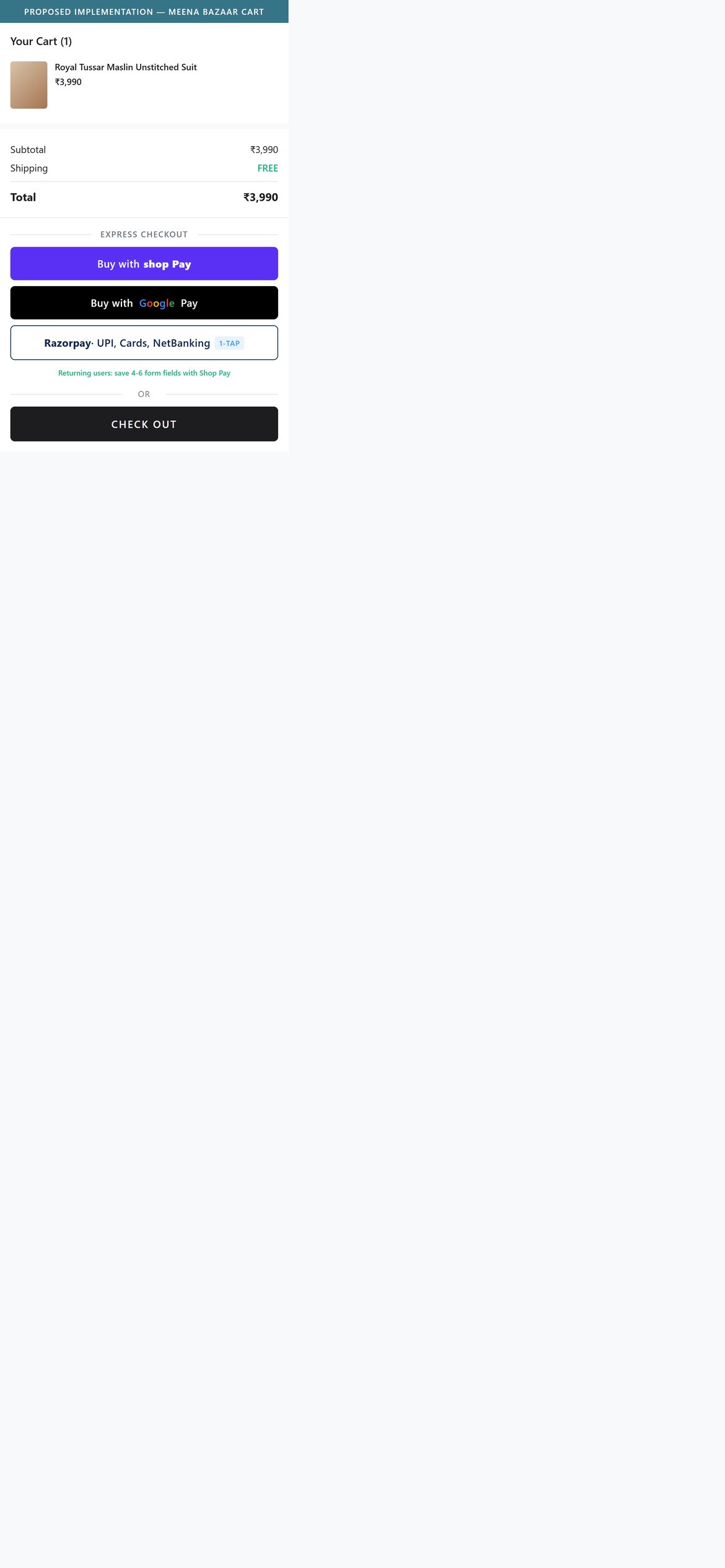
Proposed Implementation — Meena Bazaar Cart
Observations
- Cart exposes only a single CHECK OUT button -- no Shop Pay, no Google Pay, no UPI/Razorpay Magic.
- Returning Shopify customers with a stored Shop Pay token could skip the full address and payment step if the button were exposed.
- Express checkout adoption is rising fast on India ethnic-wear (Shopflo and Razorpay Magic on Libas and W for Woman).
Recommendations
- Enable Shop Pay accelerated checkout in Shopify admin and surface the Shop Pay button above the standard CHECK OUT.
- Add Razorpay Magic or Shopflo to compress address and payment into a single screen for returning users.
- Surface Google Pay or UPI as a third express tile for first-time mobile buyers who prefer UPI.
Expose a Have a promo code input on the cart page -- today the field only appears at checkout.
Feature not present
Meena Bazaar — Mobile
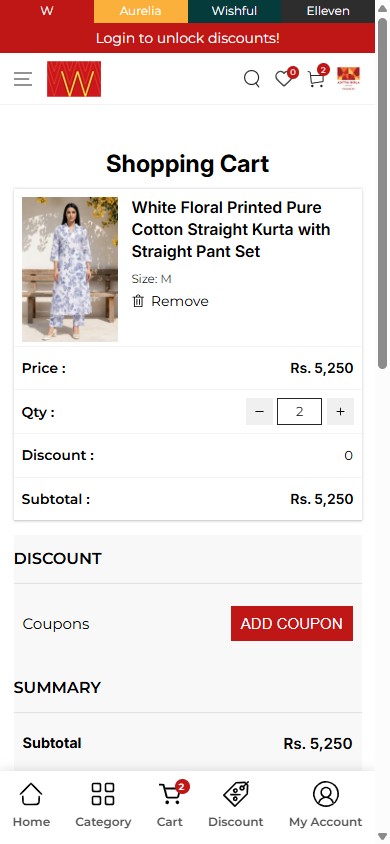
W for Woman — Mobile
Observations
- Cart copy reads discount codes calculated at checkout -- the promo input is only one screen later.
- A shopper expecting a campaign or influencer code cannot validate it before committing to checkout, fuelling drop-off when the code fails.
- Cart-level coupon fields are present on 4/5 India ethnic-wear benchmarks.
Recommendations
- Expose a collapsible Apply promo code input on the cart page directly above the subtotal.
- Validate the code via the Shopify Discount API and render the saving inline once applied.
- Pre-fill the field automatically when the customer arrives from a coupon-bearing campaign URL.
Add a You saved line above the cart subtotal -- today the cart hides aggregated MRP savings behind per-line strikethrough only.
Feature not present
Meena Bazaar — Mobile
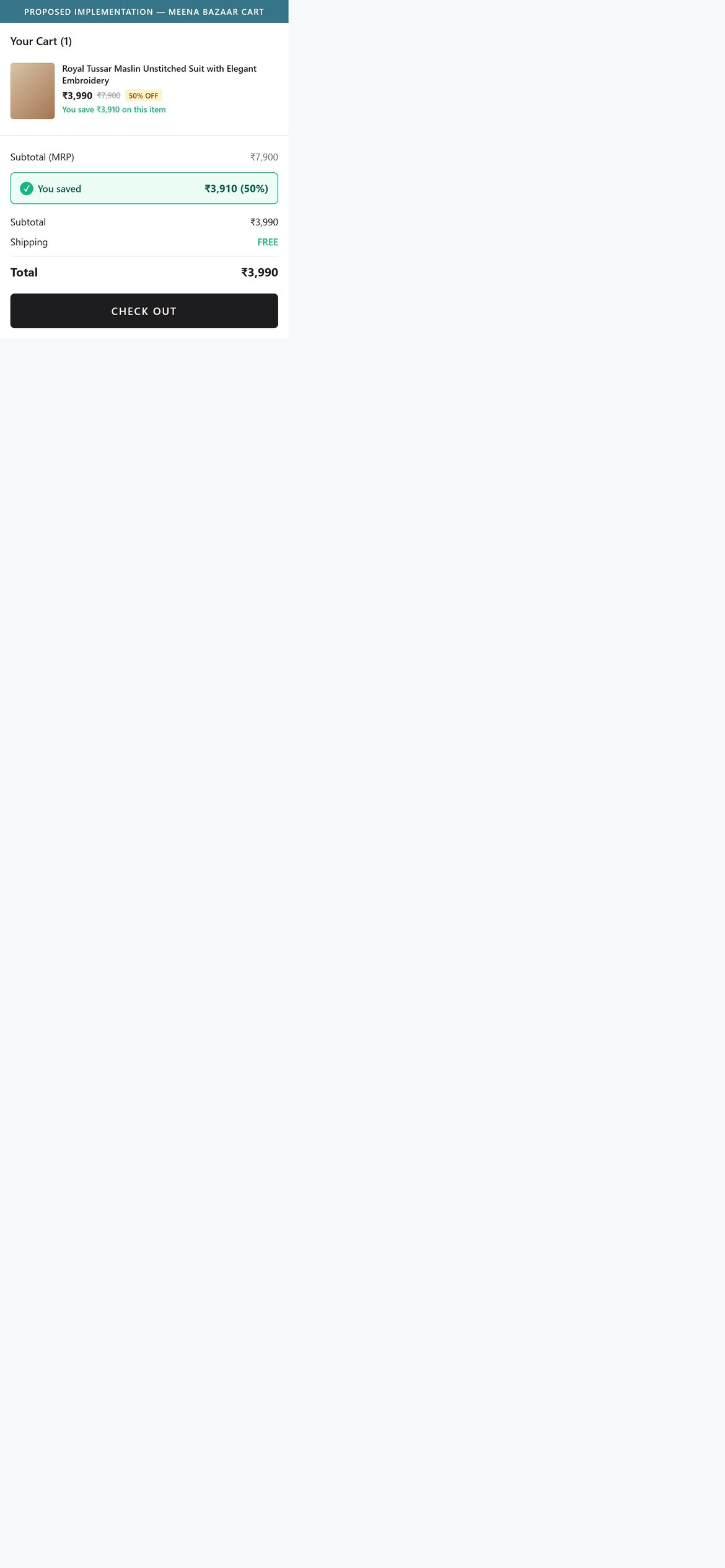
Proposed Implementation — Meena Bazaar Cart
Observations
- The cart summary shows only Subtotal -- no aggregated savings line.
- Each line item shows the discounted price but not the per-line saving, so the shopper cannot see the value they are capturing across a discounted catalogue.
- Aggregated savings displays are a 4/5 India standard across the benchmark set.
Recommendations
- Add a green You saved line above the Subtotal, summing MRP minus sale price across all line items.
- Mirror the same savings line on the checkout summary so the value claim follows the shopper.
- Use the same typographic weight as Subtotal to make the saving feel real.
04
App Ecosystem
What's installed vs what's missing from best-in-class Fashion & Apparel stores
Present (5)
Judge.me
Reviews & UGC
Installed and rendered on PDP, but no reviews collected on the audited SKU ('Be the first to write a review'). Needs a post-purchase review campaign to make the widget useful.
WhatsApp Chat
Customer Support
Floating WhatsApp button visible on every page — standard India support channel.
Iubenda Cookie Consent
Compliance
Cookie consent banner with Accepted / Deny / Manage preferences — GDPR/India DPDP-compatible.
Klaviyo (newsletter popup)
Email Capture / Marketing
'Stay stylish' popup with Name + Email fields fires on load; no coupon incentive shown ('weekly dose of styles' only). Adding a first-order discount would lift opt-in 2-3x.
Growify (agency theme)
Theme / Front-end
Footer credit 'Handcrafted by Growify' — custom-built front-end, not a stock theme.
Missing (8)
Predictive Search (Searchanise / Boost AI / Algolia) Critical
Search & Discovery
📈 Search-to-PDP CTR +25-40%
10/10 fashion stores expose predictive search dropdowns
Pincode / Delivery-Date Checker (Shiprocket / Pincode Zip Validator) Critical
Logistics & Trust
📈 PDP-to-ATC +8-12% for India tier-2/3
5/5 India fashion benchmarks expose a pincode checker on PDP
Cart Cross-sell App (Rebuy / In Cart Upsell / ReConvert) Critical
AOV Optimisation
💰 AOV uplift 8-15% via 'Complete the Look'
7/10 fashion stores show in-cart cross-sell
BNPL / EMI (Snapmint / Simpl / LazyPay) Critical
Payments & Affordability
📈 PDP ATC +5-8% on 2,000+ INR AOV
5/10 fashion brands surface BNPL on PDP (Libas, Superkicks)
Express Checkout Overlay (Shopflo / Razorpay Magic / GoKwik) Critical
Checkout Acceleration
📈 Checkout completion +10-18%
4/5 leading India ethnic-wear brands have an express overlay
Loyalty / Rewards (Loyalion / Smile.io / Yotpo) Critical
Retention
🔄 Repeat purchase rate +20-30%
4/10 fashion stores run a points/tiers programme
Wishlist App (Wishlist Plus / Smart Wishlist) Critical
Engagement
🔄 Returning-visitor PDP CTR +15%
10/10 fashion stores expose a wishlist icon
Size Guide / Fit Finder (Kiwi Sizing / Fit Predictor) Critical
PDP Conversion
📈 Returns rate -10-15% on stitched apparel
Standard on India ethnic-wear (Libas, Biba); flagged as 'STANDARD for Indian ethnic fashion' in feedback rules
App Stack Assessment
5 apps detected, 8 critical gaps identified
Confidential — Prepared for Meena Bazaar by Growisto | June 2026